MethodMatch: A Simple Tool for Finding the Right UX Research Method
I created MethodMatch to make it easy to find UX research methods that fit your project's goals, time, budget, and other constraints.

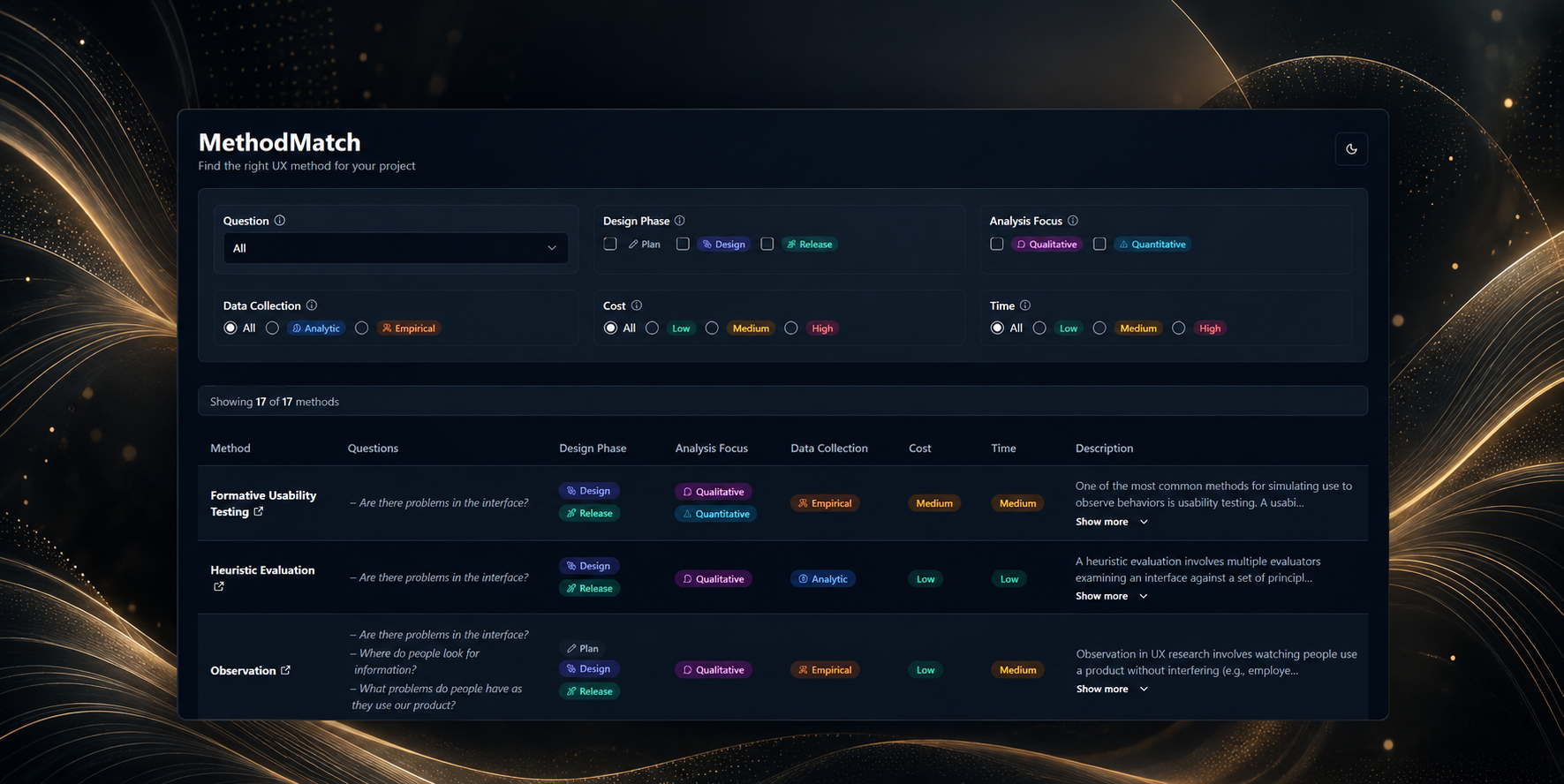
Choosing a UX research method can be surprisingly annoying.
Usually, I know roughly what I want to learn. The harder part is deciding how exactly to learn it.
Should I interview people? Run a usability test? Send a survey? Do a card sort? Would a heuristic evaluation be enough?
If you do research all the time, experience helps. If you don't, you often end up jumping between articles and method libraries, trying to remember which method fits which kind of question.
I built MethodMatch because I wanted a simpler way to make that choice.
Try it here: https://methodmatch.vercel.app/
The source code is here: https://github.com/psacramento-gh/methodmatch
Start with the question
Most UX method libraries start with the methods.
You browse through usability testing, interviews, surveys, card sorting and everything else, then try to work out which one applies to your project.
I wanted to reverse that.
MethodMatch starts by asking what you actually want to know.
For example:
- Are there problems in the interface?
- Where do people look for information?
- What features do people want?
- How does our product compare with competitors?
- Is a new interface better than an alternative?
- How should we organize content and features?
Then you add the boring but very real constraints. How much time do you have? How much can you spend? Are you still planning the product or is it already live? Do you need qualitative answers or numbers?
The list gets smaller as you go.
That's really the whole idea behind MethodMatch. Instead of trying to remember the perfect research method, eliminate the ones that don't fit.
How it works
MethodMatch currently includes 17 UX research methods:
- Formative Usability Testing
- Heuristic Evaluation
- Observation
- Tree Test
- Usability Test
- Click Test
- Task-Based Benchmark
- Retrospective Benchmark
- PURE
- Survey
- Interview
- A/B Testing
- Diary Study
- Search-Log Analysis
- True Intent
- Contextual Inquiry
- Card Sort
You can filter them by:
- the question you want to answer
- the stage of the product
- qualitative or quantitative analysis
- analytic or empiric data
- cost
- time
The results update as you change the filters, so you can play with the constraints and see how the available methods change.
I find this part particularly useful because project constraints are rarely fixed.
Maybe you would like to run moderated usability tests, but you don't have enough time. What else could you do?
Maybe you have more budget than expected. Does that open up a better method?
MethodMatch makes those alternatives visible.
A simple example
Say you have an existing interface and suspect that people are having trouble using it.
You don't have much budget, and you need an answer soon.
You can select:
Are there problems in the interface?
Low cost
Low time
One of the matches is Heuristic Evaluation.
That's useful because the default reaction in many teams would probably be, "We need a usability test."
Maybe you do. But maybe you don't.
If the goal is to find obvious interface problems this week with almost no budget, a heuristic evaluation might be a perfectly sensible first step.
Change the constraints and the suggestions change with them.
The same applies earlier in a project. If you're trying to understand what features people want, MethodMatch points you toward methods such as Interviews and Surveys. You can then compare the cost, time and kind of data each one gives you.
It doesn't choose for you. I don't think it should.
It gives you a shortlist.
The problem I really wanted to solve
There's another reason I built this.
Teams tend to repeat the research methods they already know.
If a team is comfortable running surveys, a surprising number of problems start looking like survey problems. The same happens with usability testing.
I've done this myself. You reach for the tool you know.
But familiarity isn't a good reason to choose a research method.
Sometimes the interesting part of MethodMatch is seeing a method you wouldn't have thought of.
If you're comparing two interfaces, PURE might appear next to methods you already know.
If you're working on information architecture, you might end up comparing Card Sorting with Tree Testing.
If you're investigating problems in a live product, Observation, Contextual Inquiry or Search-Log Analysis might deserve a look before you automatically schedule another usability test.
That's the behavior I want the tool to encourage.
Ask the question first. Pick the method second.
I wanted it to stay small
MethodMatch doesn't require an account.
There is no onboarding, project dashboard, AI assistant or research repository.
That is intentional.
I don't want another tool that becomes a place you have to maintain.
Open it. Set a few filters. Look at the matches. Close it.
Each method has a short explanation and a link to a more detailed resource when you need one. The references mostly point to Nielsen Norman Group and MeasuringU.
The filters also stay in the URL, which means you can bookmark a particular combination or send it to someone else.
That last bit is handy when the discussion isn't really about the method itself. It's about why you chose it.
Instead of saying, "I think we should do a tree test," you can share the constraints that led you there.
What it doesn't do
MethodMatch won't tell you what your research question should be.
That's a much harder problem.
It assumes you've already reached the point where you can say something like, "I want to know where people look for this information" or "I need to know whether version B actually performs better."
The 17 methods are also not meant to cover all of UX research. There are plenty of specialized situations that need methods or expertise that aren't in the tool.
And finding the right method doesn't mean you'll run a good study.
Recruitment matters. Sample size matters. The questions you ask matter. Analysis matters. A badly designed usability test is still a badly designed usability test, even if usability testing was the correct method to choose.
MethodMatch only deals with the first decision.
Which methods make sense here?
I think that's a small enough problem to be useful.
It's open source
MethodMatch is open source and licensed under MIT.
I built it with React, TypeScript, Vite, Tailwind and shadcn/ui.
The code is on GitHub:
https://github.com/psacramento-gh/methodmatch
There are classifications in the current dataset that I expect I'll change over time, and there are certainly methods worth adding.
That's another reason I wanted the project to be open.
Try it
MethodMatch started with a question I kept running into myself.
How can I get from "this is what I need to learn" to "these are the research methods that make sense" without digging through a pile of articles every time?
This is my answer so far:
https://methodmatch.vercel.app/
If you use UX research methods regularly, I'm particularly curious about the matches you disagree with. Those edge cases are probably where MethodMatch will get more useful.